
Efficient resource allocation is crucial for the stability and performance of services running within a Kubernetes environment like Thingshub. This document outlines how resources, primarily CPU and memory, are managed for Thingshub services, which are deployed as Kubernetes Pods.
Kubernetes utilizes the concepts of resource requests and limits to control resource consumption by containers. A request is the minimum amount of a resource that a container is guaranteed to receive, which is used by the Kubernetes scheduler to place the Pod on a suitable node. A limit is the maximum amount of a resource that a container is allowed to consume.
Exceeding a memory limit can lead to the container being terminated (OOMKilled), while exceeding a CPU limit will result in the container being throttled.
In the context of Thingshub, resource allocation can be managed at different levels depending on the service architecture.
Allocating Resources in Thingshub
For Thingshub services, the thingshub helm chart allows allocating resources for containers from the top level.
-
Top Level Allocation:
This means that resource requests and limits configured for the Thingshub service are directly applied to all the containers within its corresponding Kubernetes Pod.
global:
 ....

engine:
  resources:
    cpuRequest: XX
    cpuLimit: XX
    memoryRequest: XXMi
    memoryLimit: XXGi
    ephemeralStorageRequest: XX
    ephemeralStorageLimit: XX
-
Finer Resource Allocation:
Certian Thingshub services bring engines backing them to provide enhanced functionalities. These engines are resource intensive and require careful allocation of resources for proper functionality. Thingshub helm charts support allocating resources for these specific backing engines. This provides finer-grained control over the resource intensive engines based on one’s infrastructure setup.-
In this case,
-
The resources for the engine needs to be allocated individually within the Thingshub service configuration.
-
The resources for the sidecar containers is allocated from the top level
-
-
-
Currently, there are 3 thub-services that bring their backing engines. These are heavy-duty contianers that provide specific functionality and features.
-
Business-Objects
This service provides the features relating to the processing of business-critical data or to control your processes with your own fields and views through users' own custom fields, views and dependencies and meta infromation. -
Thingsflow
This service provides the integration platform and interface for external services. The features provide users the ability to process and logically control the flow of data from the thingshub system to external systems and environments. -
Visualizer
This service provides the dashboarding and visualization of IOT data present in the system.
-
When configuring resources for these services in Thingshub, you can specify the desired CPU and memory requests and limits for each engine.
global:
  ....


business-objects:
  resources:
      # Resource Allocation for sidecar containers
      cpuRequest: XX
      cpuLimit: XX
      memoryRequest: XXMi
      memoryLimit: XXGi
      ephemeralStorageRequest: XX
      ephemeralStorageLimit: XX

      # Resource Allocation for Business Objects engine
      business_objects_engine:
        cpuRequest: XX
        cpuLimit: XX
        memoryRequest: XXMi
        memoryLimit: XXGi
        ephemeralStorageRequest: XX
        ephemeralStorageLimit: XX

thingsflow:
  resources:
      # Resource Allocation for sidecar containers
      cpuRequest: XX
      cpuLimit: XX
      memoryRequest: XXMi
      memoryLimit: XXGi
      ephemeralStorageRequest: XX
      ephemeralStorageLimit: XX

      # Resource Allocation for Thingsflow engine
      thingsflow_engine:
        cpuRequest: XX
        cpuLimit: XX
        memoryRequest: XXMi
        memoryLimit: XXGi
        ephemeralStorageRequest: XX
        ephemeralStorageLimit: XX

visualizer:
  resources:
      # Resource Allocation for sidecar containers
      cpuRequest: XX
      cpuLimit: XX
      memoryRequest: XXMi
      memoryLimit: XXGi
      ephemeralStorageRequest: XX
      ephemeralStorageLimit: XX

      # Resource Allocation for Visualizer engine
      visualizer_engine:
        cpuRequest: XX
        cpuLimit: XX
        memoryRequest: XXMi
        memoryLimit: XXGi
        ephemeralStorageRequest: XX
        ephemeralStorageLimit: XX
Default Resources for Thingshub Services
Thingshub provides default resource configurations for services and containers if no explicit resource requests or limits are specified. These defaults are pre-configured within Thingshub Helm Charts and provide the minimum resources to start a thub-service. Default resources ensure that services have a baseline allocation even if not explicitly configured, so that all the services and dependencies are up and running and the Thingshub System is Stable.
-
Top Level Default:
YAMLresources: cpuRequest: 10m cpuLimit: 700m memoryRequest: 25Mi memoryLimit: 200Mi ephemeralStorageRequest: 10Mi ephemeralStorageLimit: 100Mi -
Business-Objects Engine:
YAMLresources: business_objects_engine: cpuLimit: 500m memoryLimit: 800Mi cpuRequest: 200m memoryRequest: 500Mi ephemeralStorageRequest: 10Mi ephemeralStorageLimit: 100Mi -
Thingsflow Engine:
YAMLresources: thingsflow_engine: cpuLimit: 45m memoryLimit: 180Mi cpuRequest: 15m memoryRequest: 60Mi ephemeralStorageRequest: 10Mi ephemeralStorageLimit: 100Mi -
Visualizer Engine:
YAMLresources: visualizer_engine: cpuLimit: 45m memoryLimit: 180Mi cpuRequest: 15m memoryRequest: 60Mi ephemeralStorageRequest: 10Mi ephemeralStorageLimit: 100Mi
Checking Current Resource Usage
To monitor the actual resource consumption of your Thingshub services running on Kubernetes, you can use standard Kubernetes tools.
-
The
kubectl topcommand is commonly used to view the current CPU and memory usage for Pods and containers.-
To check Pod usage:
kubectl top pod <pod-name> -n <namespace> -
To check container usage within a Pod:
kubectl top pod <pod-name> --containers -n <namespace> -
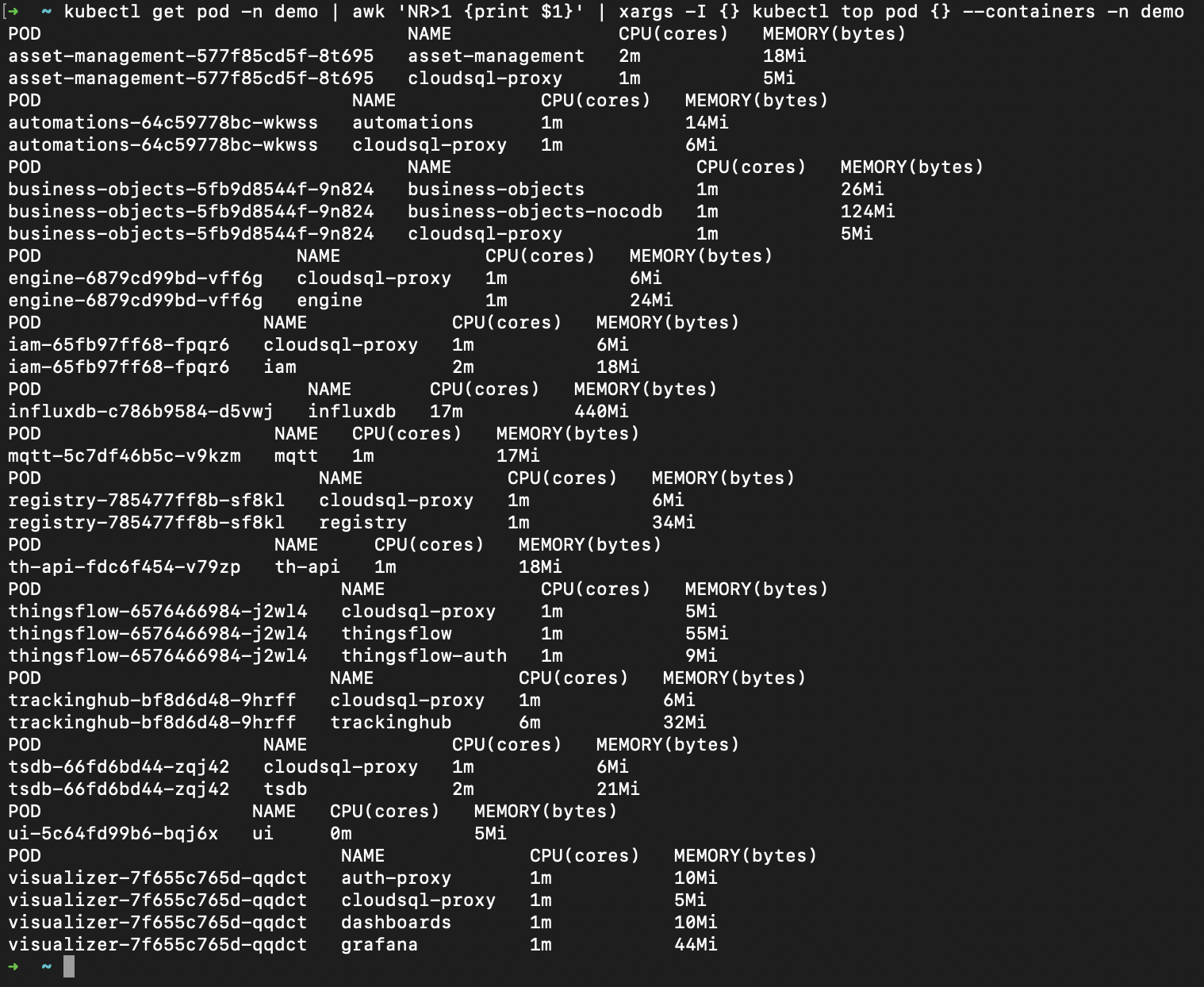
To check the container usage of all the Pods:
kubectl get pod -n demo | awk 'NR>1 {print $1}' | xargs -I {} kubectl top pod {} --containers -n demo
-
By understanding and appropriately configuring resource requests and limits for your Thingshub services, you can ensure they have the necessary resources to operate reliably while contributing to the overall efficiency and stability of the Kubernetes cluster.